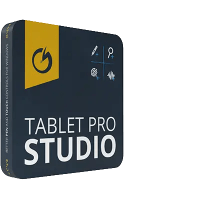

Put your most-used tools within reach with touch controls, hotkeys, and radial menus tailored to your process.

IMPROVED
Touch buttons containing all your most used keyboard shortcuts, mouse events and hotkey combinations.

NEW
The most comfortable way to work effectively one hand or holding your tablet. Designed for note taking, field operation, artwork, and 3D in mind.

IMPROVED
Remap the side buttons on your stylus and your Bluetooth button on your stylus with powerful controls that were made to level up significantly the power of your digital pen.

NEW
Use your voice to send text expansion, open specific websites, apps or send keyboard combos.

This full screen trackpad allows you to do all of your mouse controls using a transparent overlay on your screen. Customizable gestures allow you to perform most any task.

Designed to add audio feedback, clicks, beeps, invented sounds to indicate when a key is pressed. Add depth to your touch interaction.

Many programs don't support scaling and are hard to see and interact with using touch. Zoom allows full screen zooming and touch interaction for just such situations.

This touch game pad can be used in most games types. It can emulate an Xbox controller. If used in conjunction with the trackpad mode you can play even more game types.
But we all need some form of hotkeys to work quickly.
Here are the options we recommend and how they are different.
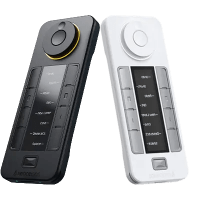
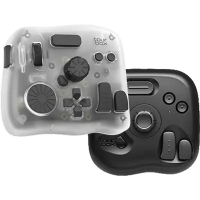
| Features | Tablet Pro Studio | Xencelabs Quick Keys | TourBox |
|---|---|---|---|
|
|
|
|
|
|
Portability |
Highest |
Medium |
Low |
|
Number of buttons |
Unlimited |
8 (5 sets) |
10-14 |
|
Visible shortcut labels |
All buttons |
8 |
|
|
Custom button layout |
Full control |
|
|
|
Control dial / knob |
|
1 dial |
Knob + dial + scroll |
|
Haptic feedback |
|
|
Elite/Elite+ |
|
Voice commands |
|
|
|
|
Stylus button remapping |
|
|
|
|
On screen trackpad / zoom |
|
|
|
|
App-specific profiles |
|
|
|
|
Cross-platform support |
Windows * |
Win + Mac |
Win, Mac, iPad, Android |
|
Battery / power |
None needed |
53h rechargeable |
Some models |
|
Price |
$49.99 Lifetime |
$100 |
$100-$300 |
|
|
* Tablet Pro STUDIO is a Windows app, so you can’t install it on an iPad/Android directly. Instead, run it on a Windows PC and use your device as a pen display (via apps like Splashtop or Astropad, wireless or wired) so you see Windows on your device and use Tablet Pro STUDIO’s on‑screen buttons there.